


Table of Contents
Bring your own Brain (LLM), we provide the Body. Browser4 is the infrastructure layer that empowers Artificial Intelligence to perceive, interact with, and survive on the World Wide Web.
While Python libraries are great for prototypes, Browser4 (built on Kotlin/JVM) is engineered for production-grade Agent Swarms. We treat web automation not as a script, but as a simulation of human behavior at scale.
We transform standard browser features into Agent Capabilities:
- 🧠 Cognitive Perception (X-SQL & ML): Your Agent shouldn't struggle with CSS selectors. Browser4 provides X-SQL and Zero-Shot ML Extraction, allowing Agents to query the web like a database and "understand" page structures without burning expensive LLM tokens.
- 🚀 Swarm Scalability: Powered by Kotlin Coroutines, Browser4 allows you to run thousands of concurrent Agent instances on a single node with minimal resource overhead. Say goodbye to memory leaks and threading bottlenecks.
- 🛡️ Survival Mode (Stealth): The web is hostile to bots. Browser4 equips your Agents with advanced Anti-Detection and Fingerprint Management, ensuring they can complete missions in the most restricted environments.
- 🦾 Full-Duplex Control: Through deep integration with CDP (Chrome DevTools Protocol), Browser4 gives your Agent "God-mode" control over network traffic, rendering, and interaction—far beyond simple clicks and scrolls.
// Give your Agent a mission, not just a script.
val agent = AgenticContexts.getOrCreateAgent()

// The Agent plans, navigates, and executes using Browser4 as its hands and eyes.
val result = agent.run("""
    1. Go to amazon.com
    2. Search for '4k monitors'
    3. Analyze the top 5 results for price/performance ratio
    4. Return the best option as JSON
""")🎬 YouTube:
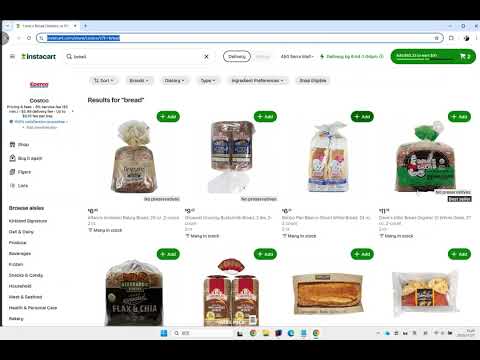
📺 Bilibili: https://www.bilibili.com/video/BV1fXUzBFE4L
Prerequisites: Java 17+ and Maven 3.6+
-
Clone the repository
git clone https://github.com/platonai/browser4.git cd browser4 -
Configure your LLM API key
Edit application.properties and add your API key.
-
Build the project
./mvnw -q -DskipTests
-
Run examples
./mvnw -pl pulsar-examples exec:java -D"exec.mainClass=ai.platon.pulsar.examples.agent.Browser4AgentKt"If you have encoding problem on Windows:
./bin/run-examples.ps1
Explore and run examples in the
pulsar-examplesmodule to see Browser4 in action.
For Docker deployment, see our Docker Hub repository.
Autonomous agents that understand natural language instructions and execute complex browser workflows.
val agent = AgenticContexts.getOrCreateAgent()

val task = """
    1. go to amazon.com
    2. search for pens to draw on whiteboards
    3. compare the first 4 ones
    4. write the result to a markdown file
    """

agent.run(task)Low-level browser automation & data extraction with fine-grained control.
Features:
- Direct and full Chrome DevTools Protocol (CDP) control, coroutine safe
- Precise element interactions (click, scroll, input)
- Fast data extraction using CSS selectors/XPath
val session = AgenticContexts.getOrCreateSession()
val agent = session.companionAgent
val driver = session.getOrCreateBoundDriver()

// Open and parse a page
var page = session.open(url)
var document = session.parse(page)
var fields = session.extract(document, mapOf("title" to "#title"))

// Interact with the page
var result = agent.act("scroll to the comment section")
var content = driver.selectFirstTextOrNull("#comments")

// Complex agent tasks
var history = agent.run("Search for 'smart phone', read the first four products, and give me a comparison.")

// Capture and extract from current state
page = session.capture(driver)
document = session.parse(page)
fields = session.extract(document, mapOf("ratings" to "#ratings"))Ideal for high-complexity data-extraction pipelines with multiple-dozen entities and several hundred fields per entity.
Benefits:
- Extract 10x more entities and 100x more fields compared to traditional methods
- Combine LLM intelligence with precise CSS selectors/XPath
- SQL-like syntax for familiar data queries
val context = AgenticContexts.create()
val sql = """
select
  llm_extract(dom, 'product name, price, ratings') as llm_extracted_data,
  dom_first_text(dom, '#productTitle') as title,
  dom_first_text(dom, '#bylineInfo') as brand,
  dom_first_text(dom, '#price tr td:matches(^Price) ~ td, #corePrice_desktop tr td:matches(^Price) ~ td') as price,
  dom_first_text(dom, '#acrCustomerReviewText') as ratings,
  str_first_float(dom_first_text(dom, '#reviewsMedley .AverageCustomerReviews span:contains(out of)'), 0.0) as score
from load_and_select('https://www.amazon.com/dp/B08PP5MSVB -i 1s -njr 3', 'body');
"""
val rs = context.executeQuery(sql)
println(ResultSetFormatter(rs, withHeader = true))
Example code:
- X-SQL to scrape 100+ fields from an Amazon's product page
- X-SQLs to crawl all types of Amazon webpages
Achieve extreme throughput with parallel browser control and smart resource optimization.
Performance:
- 100,000+ page visits per machine per day
- Concurrent session management
- Resource blocking for faster page loads
val args = "-refresh -dropContent -interactLevel fastest"
val blockingUrls = listOf("*.png", "*.jpg")
val links = LinkExtractors.fromResource("urls.txt")
    .map { ListenableHyperlink(it, "", args = args) }
    .onEach {
        it.eventHandlers.browseEventHandlers.onWillNavigate.addLast { page, driver ->
            driver.addBlockedURLs(blockingUrls)
        }
    }

session.submitAll(links)
🎬 YouTube:

📺 Bilibili: https://www.bilibili.com/video/BV1kM2rYrEFC
Automatic, large-scale, high-precision field discovery and extraction powered by self-/unsupervised machine learning — no LLM API calls, no tokens, deterministic and fast.
What it does:
- Learns every extractable field on item/detail pages (often dozens to hundreds) with high precision.
Why not just LLMs?
- LLM extraction adds latency, cost, and token limits.
- ML-based auto extraction is local, reproducible, and scalable to 100k+ ~ 200k pages/day.
- You can still combine both: use Auto Extraction for structured baseline + LLM for semantic enrichment.
Quick Commands (PulsarRPAPro):
curl -L -o PulsarRPAPro.jar https://github.com/platonai/PulsarRPAPro/releases/download/v3.0.0/PulsarRPAPro.jarIntegration Status:
- Available today via the companion project PulsarRPAPro.
- Native Browser4 API exposure is planned; follow releases for updates.
Key Advantages:
- High precision: >95% fields discovered; majority with >99% accuracy (indicative on tested domains).
- Resilient to selector churn & HTML noise.
- Zero external dependency (no API key) → cost-efficient at scale.
- Explainable: generated selectors & SQL are transparent and auditable.
👽 Extract data with machine learning agents:

(Coming soon: richer in-repo examples and direct API hooks.)
| Module | Description |
|---|---|
pulsar-core |
Core engine: sessions, scheduling, DOM, browser control |
pulsar-rest |
Spring Boot REST layer & command endpoints |
pulsar-client |
Client SDK / CLI utilities |
browser4-spa |
Single Page Application for browser agents |
browser4-agents |
Agent & crawler orchestration with product packaging |
pulsar-tests |
Heavy integration & scenario tests |
pulsar-tests-common |
Shared test utilities & fixtures |
Python/Node.js SDKs are on the way.
Set the environment variable PROXY_ROTATION_URL to the URL provided by your proxy service:
export PROXY_ROTATION_URL=https://your-proxy-provider.com/rotation-endpointEach time the rotation URL is accessed, it should return a response containing one or more fresh proxy IPs. Ask your proxy provider for such a URL.
- Problem-solving autonomous browser agents
- Parallel agent sessions
- LLM-assisted page understanding & extraction
- Workflow-based browser actions
- Precise coroutine-safe control (scroll, click, extract)
- Flexible event handlers & lifecycle management
- One-line data extraction commands
- X-SQL extended query language for DOM/content
- Structured + unstructured hybrid extraction (LLM & ML & selectors)
- High-efficiency parallel page rendering
- Block-resistant design & smart retries
- 100,000+ pages/day on modest hardware (indicative)
- Advanced anti-bot techniques
- IP & profile rotation
- Resilient scheduling & quality assurance
- Simple API integration (REST, native, text commands)
- Rich configuration layering
- Clear structured logging & metrics
- Local FS & MongoDB support (extensible)
- Comprehensive logs & transparency
- Detailed metrics & lifecycle visibility
- 💬 WeChat: galaxyeye
- 🌐 Weibo: galaxyeye
- 📧 Email: [email protected], [email protected]
- 🐦 Twitter: galaxyeye8
- 🌍 Website: platon.ai

For Chinese documentation, refer to 简体中文 README.